




Understanding the Utilities Opportunity Card
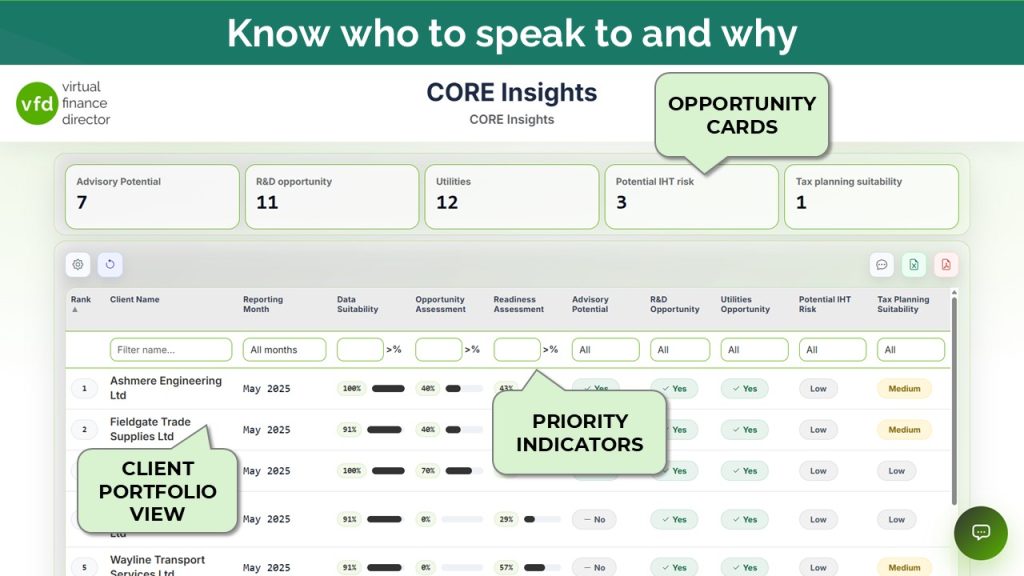
Understand why a client has been highlighted and how changes in utility spend and service categories can identify opportunities worth investigating.
Your Guide to the Utilities Opportunity
Explore the sections below to understand why a client has been highlighted, what utility costs or changes to investigate, and how to prepare for a commercial conversation.
Understanding the card
Identify clients for a utilities review
Outcome: You understand why a client has been highlighted and which utility costs may be worth investigating.
A utilities review can extend beyond electricity and gas. CORE Insights can bring attention to expenditure relating to water, telecoms, broadband, waste management, fuel and facilities services, depending on how those costs are recorded.
The purpose is to identify clients where the level, change or type of expenditure may justify further investigation. This could lead to a review of suppliers, contracts, consumption or current service arrangements.
A utilities signal is a reason to investigate, not evidence of a saving. It does not establish that the client is overpaying or that a better commercial arrangement is available.
Behind the assessment
Review spend, changes and service categories
Outcome: You understand the three indicators used in the assessment.
| Indicator | What it reviews | How to use it |
|---|---|---|
| Utility spend | Mapped utility expenditure within Cost of Sales and Overheads over the previous 12 months. | Identify clients with higher levels of utility spend that may warrant investigation. |
| Spend change | Spend in the last 12 months compared with the preceding 12 months. | Identify increases in spend and investigate what may have caused them. |
| Service categories | Distinct mapped utility categories identified over the previous 24 months. | Identify opportunities for a broader review across multiple services. |
The default materiality threshold is £10,000. Under this configuration, utility spend must be above £10,000 to trigger the overall opportunity. Spend equal to £10,000 does not trigger it.
The Spend change indicator shows increases in expenditure. The Service categories indicator shows the number of categories identified where more than one service is present.
Reading the result
Understand the materiality trigger
Outcome: You can distinguish the overall opportunity trigger from the supporting information.
The Utility spend indicator determines the overall Utilities Opportunity result. Spend change and Service categories provide additional context to help you decide what to investigate.
An increase in spend could reflect higher tariffs, increased consumption, additional premises, business growth or invoice timing. Review the underlying bills and the client’s circumstances before deciding whether the increase warrants further investigation.
A “No” result means the client’s recorded utility spend has not triggered the assessment under the applied threshold. It does not mean that existing contracts represent good value or that there are no opportunities to improve the client’s arrangements.
Illustrative figures
From utility spend to a review prompt
Outcome: You can interpret a change in utility spend without treating it as an achievable saving.
| Measure | Illustrative result |
|---|---|
| Previous 12-month spend | £20,000 |
| Latest 12-month spend | £35,000 |
| Increase in recorded spend | £15,000 |
| Utility categories identified | 2 |
With a £10,000 materiality threshold, the latest 12-month spend of £35,000 would trigger an opportunity for review. The £15,000 increase provides a useful reason to investigate, but it should not be treated as an estimate of potential savings.
The next step is to understand what has driven the increase, such as changes in consumption, business activity, premises or contract rates, before deciding whether a commercial review may be worthwhile.
The increase identifies something worth investigating. It does not indicate how much, if anything, the client could save.
Taking action
Check contracts, consumption and costs
Outcome: You have a practical checklist for investigating the opportunity and agreeing the next step.
Review the detail
- Check which accounts and services make up the recorded expenditure.
- Compare bills, consumption and unit rates across the relevant periods.
- Review contract terms, renewal dates, termination provisions and current supplier arrangements.
Identify the opportunity
- Identify the services where a commercial review may be worthwhile.
- Agree who will take the review forward and record the next action.
Questions to start the conversation
- Has your usage changed, or have your rates increased?
- When are your main utility contracts due for renewal?
- Who currently reviews supplier terms and monitors consumption?
- Have your premises, equipment or business activity changed in a way that could explain the change in costs?
Further clarification
Common questions about utilities opportunities
Does a utilities opportunity mean the client is overpaying?
No. It means recorded expenditure is above the screening threshold. Supplier terms, usage and business circumstances need to be reviewed.
Which services can be included?
The guide includes electricity, gas, water and sewerage, broadband, internet, telecoms, facilities charges, waste management, fuel and service charges. Coverage depends on the records and nominal mapping.
Is an increase in spend required to trigger the opportunity?
No. Under the guide’s methodology, spend materiality determines the overall result. An increase adds context.
Does the card calculate achievable savings?
No. Recorded spend and changes in spend help identify a review opportunity. Any saving needs to be established through a separate assessment.
What if utility costs are recorded in a general expense account?
Review the mapping and underlying records. Incomplete or inconsistent classification can affect the assessment and may require further investigation.
Continue your CORE Insights review
Review a client's card, check the supporting detail and agree a useful next action.
Return to the CORE Insights quick-start guide →